Reaction Plans Improve Quality

The real-time SPC package shows 18 plots representing the X, Y and true position of the bolt hole shown in plots 1-18. The data is exaggerated to help show how the bolt hole pattern is shifting. Source: Prolink Software Inc.
Inspecting is the first step in determining the quality of manufactured parts. But how to react when the quality begins to drift is a key question many people ask. Real-time statistical process control (SPC) identifies a problem, but it may not be the right tool for reaction plan managing.
A reaction plan can be as simple as a list of instructions to follow when things go wrong. These instructions are printed in a procedures manual or posted on a wall. The operator simply reacts to the obvious and hopefully uses some common sense for undefined situations.
But customers demand the use of SPC to track the overall quality of your operation so you purchase an SPC program. Using inspection tools and your SPC program, you group your measured part data and analyze it to determine your overall capability. You remove assignable causes and begin production. You feel good about what you have done and everything runs fine. But there seems to be one little problem-your real-time SPC program begins telling you something is slowly going wrong but it does not tell you what to do. Sound familiar?
The next level of analysis is related to a reaction plan. Simply put, a reaction plan is what to do when something changes and requires attention. In a manufacturing environment, process engineers run around the shop floor identifying and fixing these problems. Although this works, it is expensive, has inconsistent solutions and is inconvenient when the best engineer is called out of bed at 2:30 a.m.
Automating operations can be the next logical step in the evolution of data collection and analysis.
Complicated Reactions
When machining parts, injecting plastic or cutting exotic materials, simple reactions may not explain the corrective action. If calculations are needed, the instructions may involve measuring 10 parts, averaging the readings and “dialing in” an offset in the machine tool control. These types of calculations can be performed on a $2 calculator, but the time used to arrive at the correct solution gets expensive.As the manufacturing process becomes more complex with interdependencies and multiple axes, a process engineer may resort to an Excel spreadsheet. The engineer will discover the relationships affecting the process and define math equations to compute the correct offsets in the machine control. This may take many hours of observations, measurements and tweaking before the calculated answers become clear.
Now all that is left to do is teach the machine operators how to use Excel, where to type the readings into the spreadsheet, where to read the results and how to make the necessary adjustments.
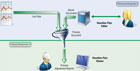
A process engineer working in her office writing the reaction plan instructions with an editor. She includes calculations, text instructions, pictures and graphs. The reaction plan is stored on an internal file server but will be run on the shop floor where the results are displayed and needed. The reaction plan software has a run-time viewer that shields the user from any complex math equations or edit capability. Source: Prolink Software Inc.
Automated Reaction Plan
Although handheld calculators and Excel are wonderful innovations, a new type of reaction plan software is needed to provide the answers- without the need for humans to make the entries. Fully automatic reaction plan software provides productivity tools to reduce complex measurement information into step-by-step instructions for machine adjustments including numbers, diagrams and pictures. Deciding how to react to a broken or shifted process is critical.Part size and statistical reports may indicate the process has drifted, but knowing what adjustments are required can be difficult. By using a reaction plan, the raw measurement data, statistical analyses results and engineering knowledge to generate specific instructions are combined.
Separate reaction plans must be written for each process because each situation is different. The reaction plan software must be flexible and programmable to handle simple and complex manufacturing issues. Diagram 1 shows a process engineer working in her office writing the reaction plan instructions with an editor. She includes calculations, text instructions, pictures and graphs.
The reaction plan is stored on an internal file server but will be run on the shop floor where the results are displayed and needed.
The reaction plan software also must have a run-time viewer that shields the user from any complex math equations or edit capability. The viewer automatically merges the correct reaction plan with the raw data arriving from the inspection area. The combination of process knowledge and raw data produces the final reaction in the operator’s work area on the shop floor. This type of automation can be equated to a custom Excel spreadsheet but without the user having to type anything.

This output is an actual plan output using the SPC data in the previous real-time data run screen. Source: Prolink Software Inc.
Bolt Hole Analysis Example
As an example, suppose one is drilling a hole pattern and the pattern begins to shift. A coordinate measuring machine (CMM) is used to measure the parts, and a real-time SPC package is used to collect and display the information.Analyzing how to adjust machine settings depends on many things such as the drilling technique. Operators need to know how much to move, how much to rotate and in what direction to make the adjustments.
In the Bolt Hole Analysis diagram, the real-time SPC package shows 18 plots representing the X, Y and true position of the bolt hole shown in plots 1 to 18. The data is exaggerated to help show how the bolt hole pattern is shifting.
Notice how hole-1X (plot-1) and hole-1Y (plot 2) is drifting up, and therefore, hole-1TP (plot 3) is almost out of specification. In fact, hole-6TP (plot-18) is red and has broken the upper specification limit. The remaining six plots show the diameter of each hole is relatively stable.
The problem should be clear; the real-time SPC package is good at collecting, analyzing and displaying the data, but it does not show the relationship of the 18 characteristics that make up this six-hole pattern. Another tool is needed to clarify the situation graphically and quantifiably and tell how to fix the process.
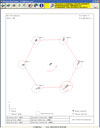
This diagram clearly shows the nominal position of the bolt hole pattern, and the pattern is rotated about CIR 3 with CIR 6 being the first hole to go out of positional specification. The red lines were added for clarity. If this condition continues, more true position holes will fail. Source: Prolink Software Inc.
The Reaction Plan Output
The reaction plan instructions of the bolt hole analysis example should be available on screen, on paper, or optionally, directly transmitted into the machine control where possible.The output in Diagram 2 is an actual plan output using the SPC data in the previous real-time data run screen. The reaction plan results list the exact adjustments needed in X-axis, Y-axis and the R-axis rotation.
Diagram 3 clearly shows the nominal position of the bolt hole pattern, and the pattern is rotated about CIR 3 with CIR 6 being the first hole to go out of positional specification. The red lines were added for clarity. If this condition continues, more true position holes will fail. In contrast, although the SPC software is showing us the condition of each individual characteristic, it was not designed to visualize or group the 18 features.
Adding automation to the factory floor to maintain consistent process control saves time and money. Translating SPC results into English instructions brings manufacturers to the next step in the evolution of process control. Feeding the SPC results directly to reaction plan management software is the natural progression of intelligently controlling machines. Q
Quality Online
For more information on statistical process control, visit www.qualitymag.com to read the following articles:“Making the Case for SPC”
“Not Your Father’s SPC”
“SPC Advances Improve Manufacturing”
Tech Tips
Looking for a reprint of this article?
From high-res PDFs to custom plaques, order your copy today!