Make Sense of Imaging Options
Learn the advantages and disadvantages of digital image file formats-such as TIFF, JPG, PING, GIFF, DICONDE-and ease the conversion toward digital imaging technology.
In addition to learning how to properly operate digital imaging equipment, it is imperative that quality assurance technicians understand the basic concepts of digital images formats. Image file formats are a standardized means of organizing, transmitting and storing digital images. In digital imaging there are two fundamental classifications of images: vector images or raster graphics images.
Rastered images are an array of ordered numeric data, the basic building block of which is the pixel or the smallest addressable screen element. However, pixels can be broken down into the most fundamental of computer codes, the bit. The bit is a base 2 numeric system, or binary numbering system, that can have a value of 1 or 0. Bits form the basis of all computer code, files and data. Fundamentally, bits are combined to create a detailed digital description of what is contained within a pixel, creating a unique address for each pixel that corresponds to its coordinates. The pixels are ordered, as determined by the bits contained within, as a grid in structured columns and rows. When combined in the proper grid order a digital image is created.
Vectored graphics images store the lines, shapes and colors that make up an image as mathematical formulae. These formulae function to order the specific points on an image that a specialized vector graphics program uses to construct the screen image. Since these formulae can produce an image scalable to any size and detail, the quality of the image is limited only by the resolution of the display. However, printing the image to paper will usually give a sharper, higher resolution output than printing it to the screen. As such, rastered images are the most commonly used digital image formats.
A bitmap or pix-map is a specific file format used to store digital images. The term bitmap originates from computer programming terminology, meaning a spatially mapped array of bits. Raster images in general may be referred to as bitmaps or pixmaps, whether synthetic or photographic. In some contexts, the term bitmap implies one bit per pixel, while pixmap is used for images with multiple bits per pixel.
Many graphical user interfaces use bitmaps in their built-in graphics subsystems; for example, the Microsoft Windows platform GDI subsystem utilizes the Windows bitmap file format, generally with the file extension of .BMP. In .BMP files, as well as in many other bitmap or pixmap file formats, images’ pixels can be stored with varying color depths depending on color scale and image resolution.
While bitmap image files are easy to process or to display on a monitor, their storage and transmission capabilities are limited due to their large size. For example, an image created by a 12 megapixel digital camera may produce an uncompressed image that occupies 36 megabytes of memory, or 288 million bits. To simplify the process of storing or transmitting bitmap images, two types of image compression algorithms-lossy and lossless-have been developed.
Lossless compression algorithms, as suggested by their name, reduce file size without sacrificing image quality. However, as the image quality is preserved the file size remains relatively large. This is the preferred option when image quality is valued above file space concerns. Lossless compression methods may be categorized according to the type of data they are designed to compress. While, in principle, any general purpose lossless compression algorithm can be used on any type of data, they achieve the best results when working with the data type they were designed for. Many of the lossless compression techniques used for text also work reasonably well for indexed images.
Most lossless compressions programs follow a two-step sequence. First, the program generates a statistical model for the input data. This model is then applied to the file and maps data to new shorter bit sequences that will replace “probable” or frequently encountered elements.
There are two primary ways of constructing statistical models: static and adaptive. In a static model, the data are analyzed according to a fixed model to produce the compressed data. This approach is simple and modular, but the model itself can be a large file. And it lacks adaptability; therefore all data types are analyzed by the same fixed model. However, adaptive models dynamically update themselves during the process of compression. As the process proceeds the program optimizes and a smaller file results.
JPEG is a compression method developed by the Joint Photographic Experts Group (JPEG). JPEG-compressed images, which in most cases are a lossy compression, are usually stored in the JFIF, JPEG File Interchange Format. The JPEG/JFIF filename extension in DOS or Windows OS is .JPG and it is the primary algorithm used in Adobe PDF files. JPEG/JFIF can be imported and exported in nearly any software than can support 8 bits per color (RGB) for a 24-bit total, producing relatively small files. Under minimal compression, the JPEG method does not noticeably detract from image quality, but JPEG files suffer generational degradation when repeatedly edited and saved.
TIFF (Tagged Image File Format) is a flexible format that normally saves 8 bits or 16 bits per color (RGB). This file format normally has a .TIF filename extension and can be either lossy or lossless. However, this format has its limitations as no single program can read every type of TIFF file. But this remains widely accepted as a photograph file and standard in the printing business as TIFF can manage device-specific color spaces (RGB).
RAW typically refers to a manufacturer specific file format that is directly written out of the imaging device. As RAW files are manufacturer specific, they are commonly associated with their own specific file extension. To open the file one needs to know the grid size specifications such as number of rows and columns, the header size and the bit order. A RAW image can either be signed or non-signed (lace or interlaced).
GIF (Graphics Interchange Format) is limited to an 8-bit palette, or 256 colors. This makes the .GIF format suitable for storing graphics with relatively few colors such as simple diagrams, shapes, logos and cartoon style images. The .GIF format supports animation. Its lossless compression is more effective when large areas have a single color, and is ineffective for detailed or dithered images.
PNG (Portable Network Graphics) file format was created as the free, open-source successor to the GIF and also can replace many common uses of TIFF. The PNG file format supports indexed-color, grayscale and truecolor (16 million colors), but it excels when the image has large, uniformly colored areas. PNG is designed to work well in online viewing applications and has full streaming ability. PNG is robust, providing both full file integrity checking and simple detection of common transmission errors. However, the lossless PNG format is best suited for editing pictures, as it preserves picture quality rather than final distribution, as it is generally a large file.
DICONDE file format is not specifically an image format, rather it has either 8 bit or 16 bit bitmap image files formats embedded in it. It has a larger text (Meta data) header so that it can store file information such as lot info, part number and serial number. This text data is written in specific order in the file so that it can be queried or searched for specific criteria. The DICONDE file format is still under development by ASTM Committee EO7. As a file storage convention, in theory it should be platform independent. The ASTM standard provides guidelines on how to format DICONDE images. However, it is sufficiently flexible that it allows for some file compatibility issues between different vendor platforms.
While it might seem confusing, learning how work with both digital imaging equipment and the images themselves is really quite simple. Despite all the new acronyms and terms, the recent improvements in imaging technology can be easily learned, thus facilitating the conversion toward digital imaging technology.
- JPEG is a compression method developed by the Joint Photographic Experts Group (JPEG).
- TIFF (Tagged Image File Format) is a flexible format that normally saves 8 bits or 16 bits per color (RGB).
- RAW typically refers to a manufacturer specific file format that is directly written out of the imaging device.
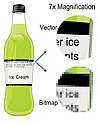
This is a comparison of a vector graphics image and a rastered (bitmap) image when the image is magnified by 7X. Source: Industrial Imaging Solutions
In addition to learning how to properly operate digital imaging equipment, it is imperative that quality assurance technicians understand the basic concepts of digital images formats. Image file formats are a standardized means of organizing, transmitting and storing digital images. In digital imaging there are two fundamental classifications of images: vector images or raster graphics images.
Rastered images are an array of ordered numeric data, the basic building block of which is the pixel or the smallest addressable screen element. However, pixels can be broken down into the most fundamental of computer codes, the bit. The bit is a base 2 numeric system, or binary numbering system, that can have a value of 1 or 0. Bits form the basis of all computer code, files and data. Fundamentally, bits are combined to create a detailed digital description of what is contained within a pixel, creating a unique address for each pixel that corresponds to its coordinates. The pixels are ordered, as determined by the bits contained within, as a grid in structured columns and rows. When combined in the proper grid order a digital image is created.
Vectored graphics images store the lines, shapes and colors that make up an image as mathematical formulae. These formulae function to order the specific points on an image that a specialized vector graphics program uses to construct the screen image. Since these formulae can produce an image scalable to any size and detail, the quality of the image is limited only by the resolution of the display. However, printing the image to paper will usually give a sharper, higher resolution output than printing it to the screen. As such, rastered images are the most commonly used digital image formats.
A bitmap or pix-map is a specific file format used to store digital images. The term bitmap originates from computer programming terminology, meaning a spatially mapped array of bits. Raster images in general may be referred to as bitmaps or pixmaps, whether synthetic or photographic. In some contexts, the term bitmap implies one bit per pixel, while pixmap is used for images with multiple bits per pixel.
Many graphical user interfaces use bitmaps in their built-in graphics subsystems; for example, the Microsoft Windows platform GDI subsystem utilizes the Windows bitmap file format, generally with the file extension of .BMP. In .BMP files, as well as in many other bitmap or pixmap file formats, images’ pixels can be stored with varying color depths depending on color scale and image resolution.
While bitmap image files are easy to process or to display on a monitor, their storage and transmission capabilities are limited due to their large size. For example, an image created by a 12 megapixel digital camera may produce an uncompressed image that occupies 36 megabytes of memory, or 288 million bits. To simplify the process of storing or transmitting bitmap images, two types of image compression algorithms-lossy and lossless-have been developed.
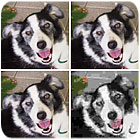
This demonstrates lossy compression. The upper left is the original image, and the upper right image is a JPEG compression 16% of original file size. The lower left is a JPEG compression 8% of original file size, the lower right image is a JPEG compression 4% of original file size. Source: Industrial Imaging Solutions
Lossy and Lossless
Lossy compression algorithms take advantage of the inherent limitations of the human eye and discard invisible information. Most lossy compression algorithms allow for variable quality levels, various levels of compression, and as these levels are increased, file size is reduced. At the higher compression levels, image deterioration becomes noticeable as “compression artifacts,” or distortions.Lossless compression algorithms, as suggested by their name, reduce file size without sacrificing image quality. However, as the image quality is preserved the file size remains relatively large. This is the preferred option when image quality is valued above file space concerns. Lossless compression methods may be categorized according to the type of data they are designed to compress. While, in principle, any general purpose lossless compression algorithm can be used on any type of data, they achieve the best results when working with the data type they were designed for. Many of the lossless compression techniques used for text also work reasonably well for indexed images.
Most lossless compressions programs follow a two-step sequence. First, the program generates a statistical model for the input data. This model is then applied to the file and maps data to new shorter bit sequences that will replace “probable” or frequently encountered elements.
There are two primary ways of constructing statistical models: static and adaptive. In a static model, the data are analyzed according to a fixed model to produce the compressed data. This approach is simple and modular, but the model itself can be a large file. And it lacks adaptability; therefore all data types are analyzed by the same fixed model. However, adaptive models dynamically update themselves during the process of compression. As the process proceeds the program optimizes and a smaller file results.
Bitmap File Formats
However, while compressing images saves transmission and storage costs, for industrial and scientific use a combination of compressed and uncompressed images are becoming standard. The most common bitmap file formats are: BMP/DIB, JPEG/JFIF, TIFF, RAW, GIF and PNG.JPEG is a compression method developed by the Joint Photographic Experts Group (JPEG). JPEG-compressed images, which in most cases are a lossy compression, are usually stored in the JFIF, JPEG File Interchange Format. The JPEG/JFIF filename extension in DOS or Windows OS is .JPG and it is the primary algorithm used in Adobe PDF files. JPEG/JFIF can be imported and exported in nearly any software than can support 8 bits per color (RGB) for a 24-bit total, producing relatively small files. Under minimal compression, the JPEG method does not noticeably detract from image quality, but JPEG files suffer generational degradation when repeatedly edited and saved.
TIFF (Tagged Image File Format) is a flexible format that normally saves 8 bits or 16 bits per color (RGB). This file format normally has a .TIF filename extension and can be either lossy or lossless. However, this format has its limitations as no single program can read every type of TIFF file. But this remains widely accepted as a photograph file and standard in the printing business as TIFF can manage device-specific color spaces (RGB).
RAW typically refers to a manufacturer specific file format that is directly written out of the imaging device. As RAW files are manufacturer specific, they are commonly associated with their own specific file extension. To open the file one needs to know the grid size specifications such as number of rows and columns, the header size and the bit order. A RAW image can either be signed or non-signed (lace or interlaced).
GIF (Graphics Interchange Format) is limited to an 8-bit palette, or 256 colors. This makes the .GIF format suitable for storing graphics with relatively few colors such as simple diagrams, shapes, logos and cartoon style images. The .GIF format supports animation. Its lossless compression is more effective when large areas have a single color, and is ineffective for detailed or dithered images.
PNG (Portable Network Graphics) file format was created as the free, open-source successor to the GIF and also can replace many common uses of TIFF. The PNG file format supports indexed-color, grayscale and truecolor (16 million colors), but it excels when the image has large, uniformly colored areas. PNG is designed to work well in online viewing applications and has full streaming ability. PNG is robust, providing both full file integrity checking and simple detection of common transmission errors. However, the lossless PNG format is best suited for editing pictures, as it preserves picture quality rather than final distribution, as it is generally a large file.
DICONDE file format is not specifically an image format, rather it has either 8 bit or 16 bit bitmap image files formats embedded in it. It has a larger text (Meta data) header so that it can store file information such as lot info, part number and serial number. This text data is written in specific order in the file so that it can be queried or searched for specific criteria. The DICONDE file format is still under development by ASTM Committee EO7. As a file storage convention, in theory it should be platform independent. The ASTM standard provides guidelines on how to format DICONDE images. However, it is sufficiently flexible that it allows for some file compatibility issues between different vendor platforms.
While it might seem confusing, learning how work with both digital imaging equipment and the images themselves is really quite simple. Despite all the new acronyms and terms, the recent improvements in imaging technology can be easily learned, thus facilitating the conversion toward digital imaging technology.
Tech Tips
- For industrial and scientific use, a combination of compressed and uncompressed images are becoming standard.- JPEG is a compression method developed by the Joint Photographic Experts Group (JPEG).
- TIFF (Tagged Image File Format) is a flexible format that normally saves 8 bits or 16 bits per color (RGB).
- RAW typically refers to a manufacturer specific file format that is directly written out of the imaging device.
Looking for a reprint of this article?
From high-res PDFs to custom plaques, order your copy today!